Temu projector emulation test: can a 1GB model run six consoles?
Two cheap Android projectors were pushed through retro emulation from NES to GameCube, and the cheaper one came out ahead

A tiny Temu projector with only 1GB of RAM ended up running PlayStation 1 and Dreamcast games on my wall. It also beat its more expensive sibling, which I didn't expect. I tested two cheap Temu projectors, one budget model and one a little pricier, and the cheaper one handled six consoles.
Both projectors run Android, which technically makes them small computers. So instead of watching movies on them, I wanted to find out how many game consoles they could replace. I started with the oldest console and moved up one generation at a time until they stopped working. Temu sent me both projectors.
The HA109 and HM102 projectors were never built for gaming
The white one is the cheaper model, the HA109. I checked the system information, and it's worse than I thought. It has 1GB of RAM with only around 300MB available, which is crazy. It has 8GB of storage and runs Android 14.
The other is the HM102, with 2GB of RAM, 16GB of storage and Android 13. It also has autofocus. As soon as you turn it on, it adjusts the image automatically, which is great. Neither one is designed for games. Their specs are meant to play a movie without overheating.
The rules were simple. Everything had to run on the projector itself: no PC, no console hidden behind the wall, no phone and no cloud gaming. The controller connects straight to the projector over Bluetooth, and the games are my own backups. The plan was to start with the cheap projector, and when it gave up, the expensive one would take over to see how far it could go.
Getting RetroArch onto the cheap HA109 took a workaround
I put the cheap projector where my teleprompter usually sits and turned off the lights. The picture is much better than I expected for this device, and it even has speakers, which surprised me. The first big surprise was that it has the Google Play Store. I figured I'd download RetroArch and be done in five minutes. Instead, RetroArch Plus couldn't be installed.
I could download a PSP emulator, but it told me the device has no file browser. A projector without a file browser. So I did it the old way. I downloaded RetroArch from its official site and installed it with an APK installer, but Android blocked it as an unsafe app built for an older version of Android. I installed it anyway, and RetroArch was finally running on the projector.
The next problem was getting my games onto it. RetroArch couldn't even find the projector's own storage, and my big external drive didn't show up at all. What finally worked was a small USB stick formatted as exFAT with an MBR partition table. If you try this, note that down, because it will save you a whole evening.
The cheap projector ran NES through PSP but stopped at GameCube
First up was the NES. It works, but there's no sound: a projector with speakers playing a game in silence. Still, it counts. The Super Nintendo with Alien vs. Predator also worked, and it ran better than I expected.
Next was the PlayStation 1, the first true 3D console, and usually the point where cheap Android devices start to struggle. On a projector with 1GB of RAM, I played a full mission, and right after it the projector restarted itself. But the game ran well. For the Nintendo 64 I picked a light game, and it works.
Then came the jump I'd been dreading, the Dreamcast. Crazy Taxi 2 crashed twice and dropped back to the home screen, but on the third try I played a full round on the cheap projector. On PSP, a Final Fantasy game worked through the story, the towns and the battles. The cheap projector was still holding on.
The GameCube, with Donkey Kong Jungle Beat, didn't work. I wanted to try the PlayStation 2 too, but I couldn't even install a PS2 emulator on it. So the cheap projector made it to PSP and stopped at GameCube.
The HM102 needed FTP and a mini keyboard to get going
Then it was time for the expensive projector, with double the RAM, autofocus and more storage. On this one, RetroArch was in the Play Store, so I installed it, updated it and that was it. Very easy. But it has only one USB port, and RetroArch couldn't see my SSD or my flash drive. Android could see them, but RetroArch saw nothing.
So I used FTP. I installed a small FTP server on the projector and, from my computer, sent all my game folders over WiFi straight to the projector's internal storage. Then RetroArch wouldn't download any cores, and my controller didn't work in the menu.
What saved me was a little mini keyboard. I'd made fun of it in an earlier Temu test and said it would be bad, but it ended up saving the whole experiment.
More RAM did not mean better performance on the HM102
The NES came first, to make sure everything worked. It runs, and there's music, but there's a lot of lag. On the cheap projector there was no sound at all, so I can't tell you which one is better here. The Super Nintendo with Alien vs. Predator works too. At first it seemed to have no lag at all, but it does lag.
The PlayStation 1 works. PlayStation 1 on a projector is, in my opinion, the best result of the whole test. For the Nintendo 64 I deliberately chose a light game again, and it works with only a little lag.
The Dreamcast with Crazy Taxi 2 is the part I didn't expect. Double the RAM, and it's slower. My guess is that the cheap projector probably has a newer graphics chip, I think, and for these games that matters more than RAM.
On PSP, Final Fantasy boots and I can play it, but it lags badly, much worse than on the cheap projector. My party died while I was waiting for the game to respond. The GameCube with Donkey Kong Jungle Beat closed immediately, every time. It was the same dead end as on the cheap projector.
The cheap Temu projector is the winner
So how many consoles can a cheap Temu projector replace? The cheap one with 1GB of RAM ran NES, Super Nintendo, PlayStation 1, Nintendo 64 and Dreamcast, and even got PSP working. That's six consoles. The expensive one ran the same games, but from the Dreamcast onward it had much more lag. Both hit the same wall at GameCube.
The winner is definitely the cheap projector, which I didn't expect. To be fair, replacing a console here means fun retro games on a huge wall. It isn't the quality of the original hardware, and not every game works. But running PlayStation 1 and Dreamcast games on a wall that size from a projector this cheap is crazy.
Watch the original
@yu-gg · YouTube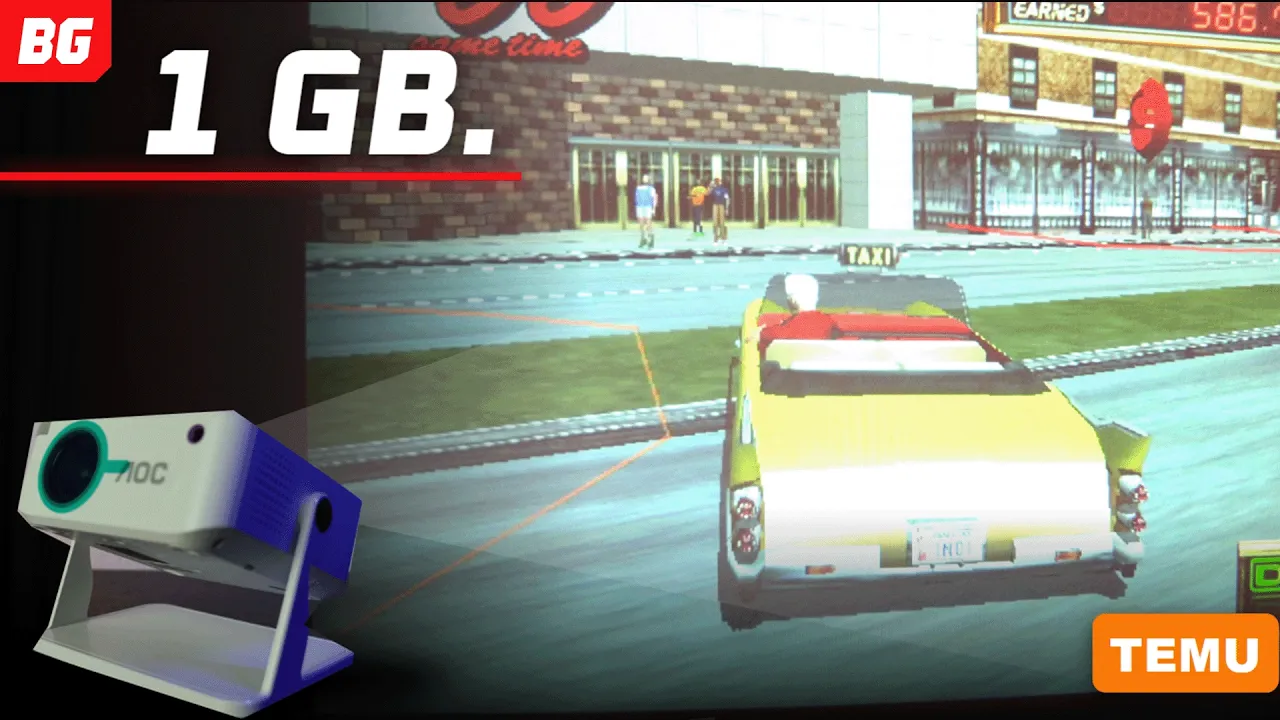
Adapted with AI from Better Gaming's video of 2 November 2026 and checked against the video before publication. Editorial standards · Corrections
More from @yu-gg
All →

Make videos? Your next one could be an article here.
We turn your videos into articles under your name, linked back to the original. You keep 60% of what they earn, non-exclusive, and you can leave whenever you like.
Become a SubPlotter →